WordPress条件判断函数实战指南:钩子时机、is_singular边界、循环重置与SEO注入
本文目录
- 条件判断函数的执行时机
- 必须在 WP_Query 完成后才能用
- 不安全的调用时机
- 核心场景一:按页面类型加载不同 JS / CSS
- 典型需求
- 核心场景二:按页面类型注入 SEO 标签
- 列表页 noindex 防止索引膨胀
- 不同模板下 canonical 指向
- 核心场景三:内容输出过滤
- 只在文章页插入广告 / 订阅表单
- 特定分类的文章追加版权声明
- 条件函数详细用法
- is_home() vs is_front_page() 的关键差异
- is_single 与 is_singular 的差异
- is_single() 参数的歧义
- is_category vs in_category
- is_tax 与自定义分类
- is_post_type_archive 与自定义文章类型
- is_paged 与 get_query_var('paged')
- is_archive 包含哪些情况
- has_excerpt 与 has_post_thumbnail
- 循环相关:is_main_query、in_the_loop、wp_reset
- 主循环 vs 副循环
- in_the_loop() 与循环重置
- 性能:避免不必要的条件判断
- 条件判断本身的开销
- 避免在循环内反复调用相同判断
- 缓存插件下条件判断的边界
- 钩子注册的时机选择
- 常见故障
- 故障 1:is_home 在首页返回 false
- 故障 2:is_category('news') 永远返回 false
- 故障 3:in_category 在循环外永远 false
- 故障 4:has_term 找不到自定义分类的 term
- 故障 5:循环嵌套后 is_singular 错乱
- 故障 6:REST API 端点里 is_singular 不工作
- 故障 7:自定义文章类型的归档页 is_archive 命中但 is_post_type_archive 不命中
- 实用代码片段集
- 仅在登录用户访问的页面执行某代码
- 仅给未付费用户显示 paywall
- 移动端单独样式
- 常见问题解答
- is_home 与 is_front_page 究竟该用哪个?
- 条件判断函数能否在 functions.php 顶层直接使用?
- 多语言插件下 is_page('contact') 找不到联系页?
- has_post_thumbnail 在自定义文章类型下不工作?
- 条件判断与 SEO 插件冲突?
- 怎样调试当前页面命中了哪些条件?
- 条件函数的性能影响大吗?
- is_admin 与 is_user_logged_in 的区别?
- 条件判断函数对 AMP 页面有效吗?
- 条件判断结果能否缓存到对象缓存?
- 权威参考资料
摘要:WordPress的条件判断标签好用,但用错钩子时机就会失效。本文先讲清plugins_loaded与init与wp与template_redirect哪些钩子能用is_xxx,再给三类核心场景——按页面类型加载JS和CSS、按类型注入SEO标签、内容输出过滤,辨清is_home与is_front_page等高频混淆函数的边界,附避免不必要条件判断的性能建议和实用代码片段。
WordPress 主题与插件开发里十有八九的代码分支判断都靠条件判断函数(Conditional Tags)。"只在首页加这段 JS"、"只在分类页 ID=15 时改样式"、"自定义文章类型的归档页 noindex"——所有这些需求的入口都是几个核心条件判断。本文不再罗列所有 is_xxx 函数(官方手册有完整列表),而是按真实开发场景把这些函数组合起来:钩子注册时机、模板树覆盖、SEO 控制、AB 测试、性能优化、缓存插件兼容,并补全每个函数的常见误用与边界条件。
条件判断函数的执行时机
必须在 WP_Query 完成后才能用
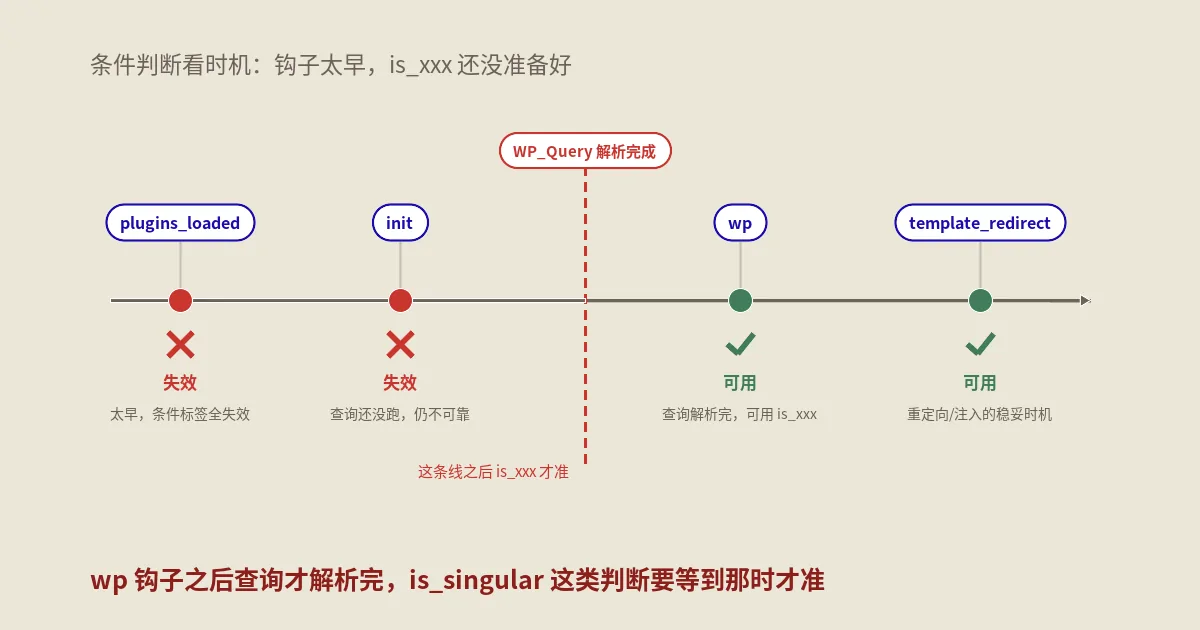
所有 is_xxx 函数底层依赖 $wp_query 全局对象。如果你在 WP_Query 解析当前请求之前调用(比如 plugins_loaded 钩子、init 钩子前期),返回值都是 false 或意外结果。安全的调用时机:
- wp 钩子之后:WordPress 完成主查询后触发,is_xxx 全部可用。
- template_redirect 钩子:在加载主题模板前触发,最常用的“按页面类型分支”的钩子位置。
- 主题模板文件内部:header.php、index.php、single.php 等模板加载时主查询已经完成,可直接用。
- 主循环内部:循环体里 is_single、has_excerpt、in_the_loop 等都是当前文章上下文。
不安全的调用时机
下面这些场景里调用 is_xxx 大概率拿到错误结果:
- plugins_loaded、init、admin_init 钩子:太早,主查询还没解析完。
- functions.php 顶层(不在钩子内):functions.php 在每次请求初期被加载,此时 $wp_query 未就绪。
- REST API 端点内:REST API 走独立路由,不解析模板查询,is_xxx 全返回 false。
- WP-CLI 命令内:CLI 不模拟 HTTP 请求上下文。
解决:把代码挪到 wp 或 template_redirect 钩子内:
add_action( 'template_redirect', function() {
    if ( is_home() ) {
        // 首页才执行的代码
    }
});
核心场景一:按页面类型加载不同 JS / CSS
典型需求
商品详情页加载产品图缩放库;首页加载轮播图库;联系页加载地图 SDK;其它页面什么都不加。这种场景每个站都遇到,错误做法是把所有 JS 都塞进 footer,正确做法是按条件 enqueue。
add_action( 'wp_enqueue_scripts', function() {
    // 首页:轮播图
    if ( is_front_page() ) {
        wp_enqueue_script( 'swiper', 'https://cdn.jsdelivr.net/npm/swiper@11/swiper-bundle.min.js', [], '11.0', true );
        wp_enqueue_style( 'swiper-css', 'https://cdn.jsdelivr.net/npm/swiper@11/swiper-bundle.min.css' );
    }

    // 单文章页:图片缩放 + 代码高亮
    if ( is_singular( 'post' ) ) {
        wp_enqueue_script( 'lightbox', get_template_directory_uri() . '/js/lightbox.js', ['jquery'], '2.11', true );
        wp_enqueue_style( 'prism', get_template_directory_uri() . '/css/prism.css' );
    }

    // 联系页(特定 page slug)
    if ( is_page( 'contact' ) ) {
        wp_enqueue_script( 'amap', 'https://webapi.amap.com/maps?v=2.0&key=YOUR_KEY', [], null, true );
    }
});
这种条件加载平均能减少 30-60% 的 JS 字节量,对 LCP 改善明显。
核心场景二:按页面类型注入 SEO 标签
列表页 noindex 防止索引膨胀
add_action( 'wp_head', function() {
    // 标签页、作者页、日期归档:noindex,follow
    if ( is_tag() || is_author() || is_date() ) {
        echo '<meta name="robots" content="noindex,follow">' . "\n";
        return;
    }
    // 搜索结果页、404:noindex,nofollow
    if ( is_search() || is_404() ) {
        echo '<meta name="robots" content="noindex,nofollow">' . "\n";
        return;
    }
    // 分页第 2 页之后:noindex,follow
    if ( is_paged() ) {
        echo '<meta name="robots" content="noindex,follow">' . "\n";
        return;
    }
});
不同模板下 canonical 指向
WordPress 自动生成的 canonical 在大多数场景正确,但某些 SEO 插件会盖掉。需要手动校正时:
add_action( 'wp_head', function() {
    if ( is_singular() ) {
        $canonical = get_permalink();
    } elseif ( is_home() || is_front_page() ) {
        $canonical = home_url( '/' );
    } elseif ( is_category() || is_tag() || is_tax() ) {
        $canonical = get_term_link( get_queried_object() );
    } else {
        return; // 其它情况让 WP 默认或 SEO 插件处理
    }
    echo '<link rel="canonical" href="' . esc_url( $canonical ) . '">' . "\n";
}, 5 );
核心场景三:内容输出过滤
只在文章页插入广告 / 订阅表单
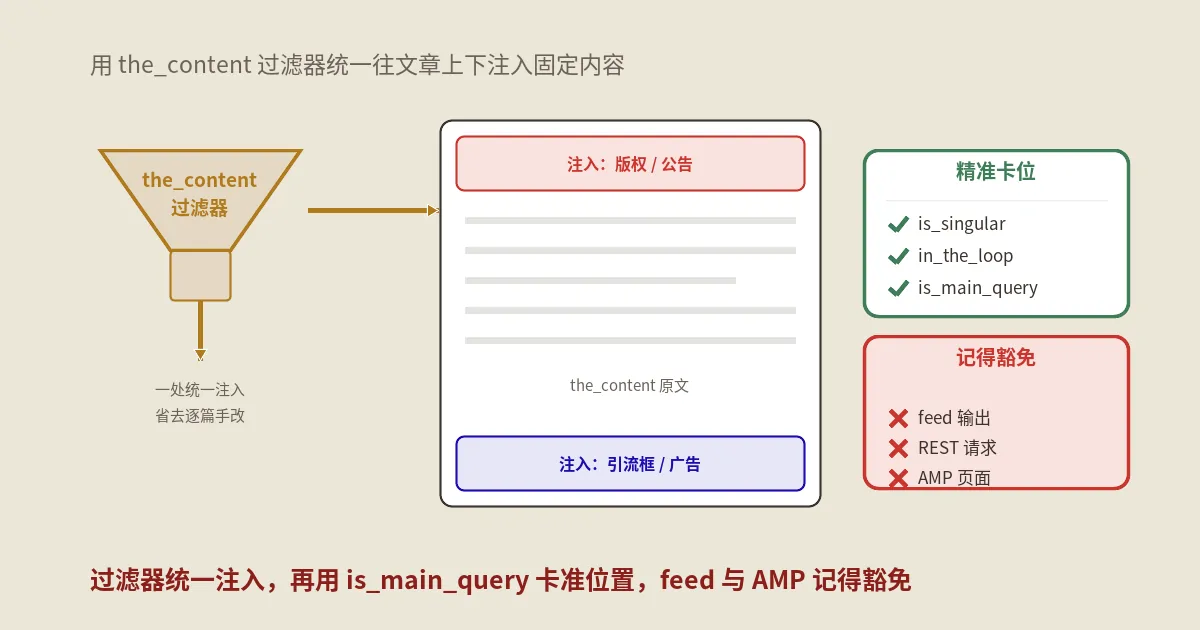
add_filter( 'the_content', function( $content ) {
    // 仅在单文章页 + 主循环内 + 不是搜索结果
    if ( ! is_singular( 'post' ) || ! in_the_loop() || ! is_main_query() ) {
        return $content;
    }
    // 仅文章长度超过 1000 字才插入
    if ( str_word_count( strip_tags( $content ) ) < 1000 ) {
        return $content;
    }

    $cta = '<div class="newsletter-cta">订阅周刊获取更多内容</div>';
    // 在第二个 </p> 后插入
    $count = 0;
    return preg_replace_callback( '/<\/p>/', function( $m ) use ( $cta, &$count ) {
        $count++;
        return $count === 2 ? '</p>' . $cta : '</p>';
    }, $content );
});
这段代码合在一起做了五件防御性判断:is_singular('post') 限单文章;in_the_loop() 防止主循环外(比如相关文章 widget)也被改;is_main_query() 防止子查询命中;字数下限避免短文章被插得密密麻麻;只插一次而不是每个段落都插。
特定分类的文章追加版权声明
add_filter( 'the_content', function( $content ) {
    if ( ! is_singular( 'post' ) || ! in_the_loop() || ! is_main_query() ) {
        return $content;
    }
    if ( in_category( 'translation' ) ) {
        $content .= '<p class="translation-credit">本文为翻译文章,原文链接见文末。</p>';
    }
    if ( in_category( ['premium', 'paid-content'] ) ) {
        $content .= '<p class="paid-notice">此为付费内容,禁止转载。</p>';
    }
    return $content;
});
条件函数详细用法
is_home() vs is_front_page() 的关键差异
这是新手最常踩的坑。两者都是“首页判断”但行为不同:
- is_home():返回 True 的条件是“文章列表页”。如果后台“设置-阅读”选了“最新文章”作为首页,is_home() 在首页返回 True;如果选了静态页面作为首页,is_home() 在那个静态页面返回 False,反而在“文章列表页”(设置里指定的那个 page)返回 True。
- is_front_page():返回 True 的条件是“站点首页”。无论后台设置“最新文章”还是“静态页”,访问域名根目录就 True。
实战经验:要"在域名根目录页面执行某代码",永远用 is_front_page();要"在文章流页面执行",用 is_home()。
is_single 与 is_singular 的差异
- is_single():仅匹配“文章 post 类型”与“自定义文章类型”(不含 page、attachment)。
- is_page():仅匹配“页面 page 类型”。
- is_singular():is_single OR is_page OR is_attachment 的并集。
- is_attachment():仅匹配“附件页”。
如果你想"任意单页面(文章/页面/附件)都执行某代码",is_singular() 最简洁。
is_single() 参数的歧义
is_single( 17 ) 既匹配 ID=17 也匹配 slug='17',因为 WordPress 不区分。如果你的某篇文章的 slug 真的是数字字符串"17",会被误命中。规避:
// 严格按 ID 判断
if ( is_single() && get_the_ID() === 17 ) { ... }
is_category vs in_category
- is_category( 'news' ):当前是不是“news 这个分类的归档页”。在分类列表页有效。
- in_category( 'news' ):当前文章是不是属于 news 分类。在文章页有效,必须在循环内。
常见混用:用 is_category 判断单文章,永远 false;用 in_category 判断分类页,逻辑也错。两者用途完全不同。
is_tax 与自定义分类
WP 自带的分类(category)与标签(tag)有专门的 is_category / is_tag 函数。但如果你注册了自定义分类(custom taxonomy),比如“品牌 brand”“产品系列 series”,需要用 is_tax:
// 当前是 brand 自定义分类的归档页
if ( is_tax( 'brand' ) ) { ... }

// 当前是 brand=apple 的归档页
if ( is_tax( 'brand', 'apple' ) ) { ... }

// 当前是 brand=apple/samsung/huawei 任一的归档页
if ( is_tax( 'brand', ['apple', 'samsung', 'huawei'] ) ) { ... }
对应的 is_category 不能传自定义 taxonomy slug,传了无效。
is_post_type_archive 与自定义文章类型
注册了 product、portfolio、event 这种自定义文章类型时,对应的归档页(example.com/product/)用 is_post_type_archive:
if ( is_post_type_archive( 'product' ) ) { ... }
if ( is_post_type_archive( ['product', 'event'] ) ) { ... }
is_paged 与 get_query_var('paged')
is_paged() 在第 2 页及之后返回 True,第 1 页返回 False。但很多场景需要知道具体是第几页:
$current_page = max( 1, get_query_var( 'paged' ) );
if ( $current_page > 1 ) {
    // 分页第 2 页之后的逻辑
}
get_query_var('paged') 在第 1 页返回 0(不是 1),所以要 max(1, ...) 兜底。
is_archive 包含哪些情况
is_archive() 是个并集函数,下面任一为真它就为真:
- is_category
- is_tag
- is_tax
- is_author
- is_date(含 is_year、is_month、is_day)
- is_post_type_archive
实际开发里 is_archive 用得不多,多数场景需要更具体的子判断。
has_excerpt 与 has_post_thumbnail
这两个函数判断当前文章的字段:
if ( has_post_thumbnail() ) {
    the_post_thumbnail( 'medium' );
} else {
    echo '<img src="' . get_template_directory_uri() . '/images/placeholder.jpg">';
}

if ( has_excerpt() ) {
    the_excerpt(); // 用手动 excerpt 字段
} else {
    echo wp_trim_words( get_the_content(), 50 ); // 自动截断
}
循环相关:is_main_query、in_the_loop、wp_reset
主循环 vs 副循环
WordPress 一个页面可以有多个 WP_Query。主查询是 URL 自动触发的(比如分类页的文章列表),副查询是你在主题里 new WP_Query() 创建的(比如侧栏“热门文章”)。
区别它们:
add_filter( 'pre_get_posts', function( $query ) {
    if ( is_admin() || ! $query->is_main_query() ) {
        return; // 只改主查询
    }
    if ( is_home() ) {
        $query->set( 'posts_per_page', 20 ); // 首页每页 20 篇
    }
});
in_the_loop() 与循环重置
循环嵌套时如果不重置全局 $post,外层循环会拿到内层最后一次 the_post() 的状态。三个重置函数:
- wp_reset_postdata():恢复全局 $post 到主查询当前文章。new WP_Query 后用这个。
- wp_reset_query():恢复全局 $post + 销毁 $wp_query。query_posts() 后用(不推荐用 query_posts 本身)。
- rewind_posts():重置当前查询的指针,可以重新跑一遍同一查询。
实战建议:永远用 new WP_Query + wp_reset_postdata 组合,不要用 query_posts。后者修改主查询全局变量,会引发各种诡异问题。
性能:避免不必要的条件判断
条件判断本身的开销
多数 is_xxx 函数 O(1) 复杂度(直接读 $wp_query 的属性),单次调用纳秒级。但 is_singular、is_post_type_archive 这种带参数版本会做字符串比较,参数为数组时遍历开销稍大。
避免在循环内反复调用相同判断
// 不好:循环 100 次每次都判断 is_singular
foreach ( $items as $item ) {
    if ( is_singular( 'post' ) ) {
        // ...
    }
}

// 好:循环外判断一次
$is_post = is_singular( 'post' );
foreach ( $items as $item ) {
    if ( $is_post ) {
        // ...
    }
}
缓存插件下条件判断的边界
WP Super Cache、W3 Total Cache 等基于“整页静态化”的缓存插件,第一次访问时执行 PHP 并写缓存文件,后续访问直接发缓存。如果你的条件判断结果依赖动态因素(用户登录态、cookie、A/B 实验组),缓存会让所有用户看到同一个版本。
规避:把动态判断挪到 JS 端(前端 fetch 当前用户状态再渲染),或者给缓存插件配置“按用户角色 / 按设备分桶缓存”。
钩子注册的时机选择
| 钩子 | 触发时机 | is_xxx 是否可用 |
|---|---|---|
| plugins_loaded | 插件加载后 | 否 |
| init | WP 核心初始化后 | 否 |
| wp_loaded | WP + 插件 + 主题全部加载 | 否(主查询还没跑) |
| parse_request | 请求解析中 | 否 |
| wp | 主查询完成 | 是 |
| template_redirect | 主题模板加载前 | 是(最常用) |
| wp_head | 模板 head 内 | 是 |
| wp_enqueue_scripts | 队列脚本时 | 是 |
| the_content(filter) | 正文输出 | 是 |
常见故障
故障 1:is_home 在首页返回 false
后台“设置-阅读”选了“静态页面作为首页”。is_home 在这种情况下不再指首页而是指文章流页。改用 is_front_page。
故障 2:is_category('news') 永远返回 false
三个排查:'news' 是不是分类的 slug 而不是名字(is_category 同时匹配 ID/slug/name 但拼写要严格);分类的 slug 是不是 URL 编码的中文;当前页面真的是分类归档页吗(is_archive 看一下)。
故障 3:in_category 在循环外永远 false
必须在主循环内(the_post() 已调用让 $post 全局可用)。在 widget、sidebar 那种循环外直接调用拿不到当前文章。
故障 4:has_term 找不到自定义分类的 term
has_term( 'apple', 'brand' ) 第一个参数应是 slug 或 ID,不是显示名。常见把 'Apple' 写成 'apple' 没注意大小写。
故障 5:循环嵌套后 is_singular 错乱
侧栏 widget 跑了 new WP_Query 没 wp_reset_postdata,全局 $post 指向 widget 的最后一篇文章,is_singular 判断的还是这篇而不是主查询。每个 new WP_Query 后强制 wp_reset_postdata。
故障 6:REST API 端点里 is_singular 不工作
REST API 不解析模板查询,所有 is_xxx 都是 false。如果你的端点需要类似的判断,从请求参数里自己解析。
故障 7:自定义文章类型的归档页 is_archive 命中但 is_post_type_archive 不命中
注册自定义文章类型时 has_archive 必须设为 true(默认 false)。如果设了 false,归档 URL 仍能访问但不算 post_type_archive。
实用代码片段集
仅在登录用户访问的页面执行某代码
if ( is_user_logged_in() && is_singular() ) {
    // 已登录用户在文章页执行
}
仅给未付费用户显示 paywall
add_filter( 'the_content', function( $content ) {
    if ( ! is_singular( 'post' ) || ! in_the_loop() ) return $content;
    if ( current_user_can( 'subscriber' ) || current_user_can( 'administrator' ) ) return $content;
    if ( ! has_term( 'premium', 'category' ) ) return $content;

    $words = str_word_count( strip_tags( $content ) );
    if ( $words > 200 ) {
        $excerpt = wp_trim_words( $content, 200, '...' );
        return $excerpt . '<div class="paywall"><p>此内容仅对订阅会员开放。</p><a href="/subscribe">立即订阅</a></div>';
    }
    return $content;
});
移动端单独样式
add_action( 'wp_enqueue_scripts', function() {
    if ( wp_is_mobile() && is_singular() ) {
        wp_enqueue_style( 'mobile-article', get_template_directory_uri() . '/css/mobile-article.css' );
    }
});
wp_is_mobile 用 UA 检测,不是 100% 可靠(部分平板会被误判),但够用于一般场景。
常见问题解答
is_home 与 is_front_page 究竟该用哪个?
判断"用户访问的是站点首页(域名根目录)"用 is_front_page,无论后台设置如何都可靠;判断"是文章流列表页"用 is_home,搭配 is_paged 处理分页。如果你的站点首页就是文章列表(默认配置),两个函数效果一致。
条件判断函数能否在 functions.php 顶层直接使用?
不能。functions.php 在每次请求初期被加载,主查询还没解析完,所有 is_xxx 都不可靠。必须挂到钩子里(最常用 wp、template_redirect、wp_enqueue_scripts、wp_head)。
多语言插件下 is_page('contact') 找不到联系页?
WPML、Polylang 给每种语言生成不同的 page,slug 可能是 contact、contact-en、contact-zh 等。判断时应该按 page ID 而不是 slug:if ( is_page( get_option('page_for_contact') ) ) 或用插件提供的 API(pll_current_language() 等)。
has_post_thumbnail 在自定义文章类型下不工作?
注册自定义文章类型时 supports 数组要包含 'thumbnail':register_post_type( 'product', ['supports' => ['title', 'editor', 'thumbnail'], ...] )。否则后台连“设置特色图”按钮都没有。
条件判断与 SEO 插件冲突?
Yoast SEO、Rank Math 都用钩子注入 robots、canonical 标签。如果你也注入会出现重复。建议:要么完全用 SEO 插件管,要么禁用插件对应模块再自己写。混着用会反复盖。
怎样调试当前页面命中了哪些条件?
add_action( 'wp_footer', function() {
    if ( ! current_user_can( 'manage_options' ) ) return;
    $checks = ['is_home','is_front_page','is_singular','is_single','is_page','is_archive','is_category','is_tag','is_tax','is_author','is_search','is_404','is_paged'];
    echo '<pre style="background:#000;color:#0f0;padding:10px">';
    foreach ( $checks as $c ) {
        if ( call_user_func( $c ) ) echo "$c: TRUE\n";
    }
    echo '</pre>';
});
登录管理员账号访问任意页面,footer 会列出所有命中的条件函数。调试完删掉。
条件函数的性能影响大吗?
极小。多数 is_xxx 是 O(1) 字段读取,单次调用几纳秒。即使 wp_head 里串十几个 if 判断,对页面渲染时间影响在毫秒级以下。性能瓶颈通常在数据库查询而不是条件判断。
is_admin 与 is_user_logged_in 的区别?
is_admin 判断"当前请求是不是 wp-admin 后台请求"(与用户角色无关);is_user_logged_in 判断"当前用户登录了没"。前台访问的登录管理员:is_admin=false,is_user_logged_in=true。
条件判断函数对 AMP 页面有效吗?
WP 的 AMP 插件在 AMP 模式下会调整模板加载流程,但 is_xxx 函数仍可用。AMP 模式有专门的 is_amp_endpoint() 函数判断当前请求是不是 AMP 版本。
条件判断结果能否缓存到对象缓存?
可以但意义不大。is_xxx 本身已经是读 $wp_query 字段,比从对象缓存(Redis/Memcached)读还快。缓存反而会引入序列化开销。
权威参考资料
本文标题:《WordPress条件判断函数实战指南:钩子时机、is_singular边界、循环重置与SEO注入》
版权声明:本文原创,转载与引用请注明作者与原文链接。许可协议: CC BY 4.0